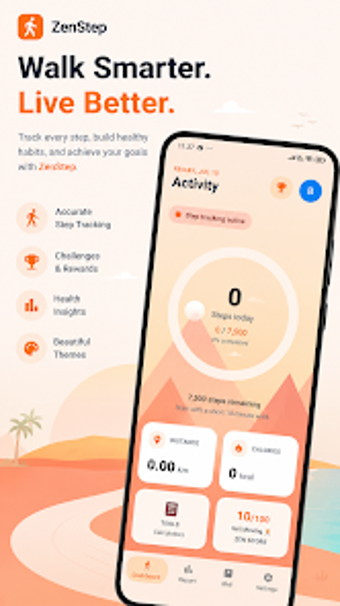
ZenStep, Android pedometer with a built-in BMI calculator
ZenStep - Step Counter, from ZenNext Studios, is an Android pedometer for daily movement tracking and basic wellness monitoring. The app provides automatic real-time step counting, a daily fitness tracker, and a built-in BMI calculator to monitor activity and simple health metrics across each day. It keeps historical trends and offers a minimalist layout designed for quick access to core numbers and weekly comparisons. Casual walkers and routine-seekers gain low-effort motivation and habit support from the app.
Tracks daily movement automatically with steady background counting
ZenStep uses a real-time pedometer for automatic daily step counting, so ordinary walks, commutes, and household movement register without manual input. The app couples live totals with a daily fitness tracker and historical data, which makes it practical for checking mid-day progress or comparing week-to-week activity. In everyday use this supports short, repeatable goals and visible trend checks that help sustain a movement habit.
Integrates with Android sensors while keeping storage and battery demand low
Built for Android, ZenStep relies on pedometer technology and captures movement while the device is carried by the user, and it requests standard Android permissions for activity tracking. The installer typically requires 30 MB to 45 MB of storage, reflecting the developer's focus on a small footprint. That combination fits phones with limited space and suits users who prefer an app that minimizes resource demands during routine use.
Minimal interface supports quick checks but trades away deep analysis
ZenNext designed the app around a 'Zen' minimalist experience, prioritizing clarity and low onboarding friction so metrics are available with few taps. This orientation benefits casual walkers, fitness newcomers, and busy people who want straightforward feedback rather than complex charts. Users seeking granular exercise breakdowns or extensive customization may find the presentation too spare, while those focused on consistent daily checks gain a low-distraction companion for habit formation.
To sum up, a practical daily companion for habit-oriented walkers
ZenStep is a practical option for casual walkers and people building regular activity habits who want low-overhead daily motivation; it is less suited to those who require granular exercise metrics. Pro tip: keep your device in a consistent pocket and review your morning summary to make small gains visible. This approach helps maintain momentum without adding complexity to an everyday routine.